Get your data from Amazon
Not browsing at all. Amazon will send you everything it has recorded about you — shopping history, and if you own an Echo or any other Alexa-enabled device, a sound clip of every recording alongside what Alexa thought it heard.
This page is a guide to requesting your data from Amazon. We do not read or report on Alexa data — there is nothing to upload here.
01
Open Amazon's contact page for your region
Amazon handles this per marketplace, so use the site you actually shop on. The links are below.
02
Choose "Prime and more"
Depending on the region the menu is called "Prime and more" or "Prime or something else". Selecting it gives you two drop-down options.
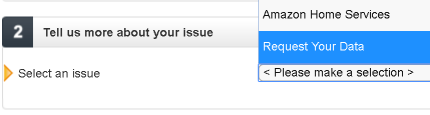
03
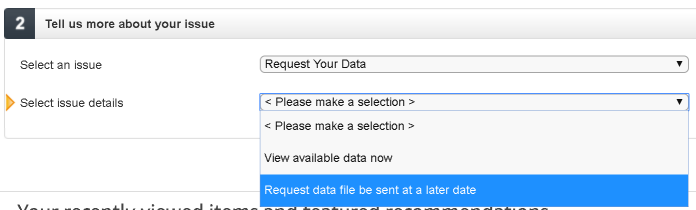
Ask for your data
Work through the drop-downs to the data request option and submit it.
04
Wait — genuinely, weeks
This is the slow part. Where Google Takeout returns a browsing-history export in minutes, Amazon has taken weeks to assemble a full data request. It may well have improved since this guide was written.
05
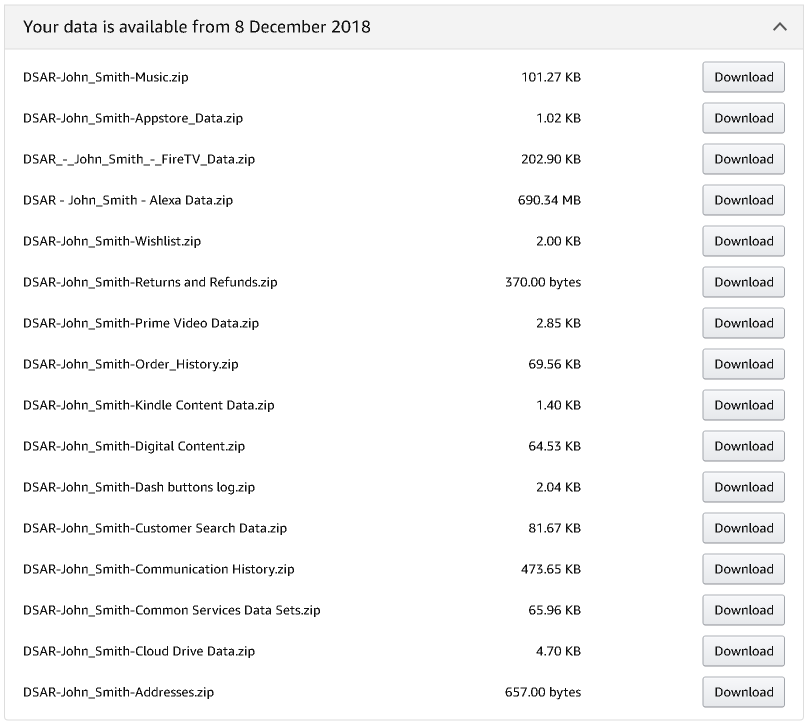
What arrives
A set of archives covering everything Amazon holds — orders, devices, advertising, and the Alexa recordings if you have an Alexa device.
06
Reading the Alexa recordings
The Alexa data includes Transcriptions.csv, an index listing the date and time, what Alexa heard, and the name of the matching sound file in the download. Worth knowing: Alexa does not record continuously. It records after hearing its wake word, which defaults to "Alexa" but can be changed.

Browsing history is the fast one
Amazon can take weeks. A Google Takeout request narrowed to Chrome browsing history usually comes back in minutes, and we read that one.
Already on this computer: